

Jessie Moore has been writing professionally for nearly two decades; for the past seven years, she's focused on writing, ghostwriting, and editing in the finance space. She is a Today Show and Publisher's Weekly-featured author who has written or ghostwritten 10+ books on a wide variety of topics, ranging from day trading to unicorns to plant care.
You’re drowning in financial accounts. Bank accounts here, investment accounts there, crypto wallets somewhere else, and maybe a 401(k) you haven’t checked in months. Sound familiar?
I’ve been there. And I’ve discovered that the secret to financial clarity isn’t just earning more or spending less — it’s seeing your entire financial picture in one place. That’s where comprehensive financial tracking apps come in.
In this guide, I’m going to break down two popular wealth tracking platforms: the Empower Personal Dashboard (which we’ll refer to as the Empower app) and Kubera. Empower includes budgeting features alongside investment tracking, while Kubera is strictly a net worth and portfolio tracker with no budgeting tools.
One is completely free with robust features, while the other charges an annual fee for specialized tracking capabilities. By the end, you’ll know exactly which tool fits your financial life — or whether you need a different app like Empower altogether.
We’ll compare everything from budgeting and investment tracking to security features and user experience. Whether you’re tracking simple bank accounts or complex portfolios spanning crypto, real estate, and alternative investments, this Kubera vs Empower showdown will help you make the right choice.
What is Empower?
The Empower Personal Dashboard (app was formerly Personal Capital) is a free financial management platform that gives you a 360-degree view of your finances.
Going forward, we’ll refer to it as the Empower app. It’s like having a financial control center that automatically syncs your checking, savings, credit card, loan, and investment accounts into one comprehensive dashboard.
Empower (part of the Empower Retirement / Great-West Lifeco corporate family) is one of the largest retirement services providers in the U.S., ranked by total plan participants. It administers approximately $1.8 trillion in retirement and related assets for about 19 million people as of 2025.
In addition to workplace retirement plans and wealth management services, the company offers financial products such as IRAs, cash management accounts, and brokerage accounts.
This article focuses on the Empower Personal Dashboard — the company’s free financial tracking and planning tool available to individual consumers.
Core Features
The Empower app excels at connecting the dots between your day-to-day cash flow and long-term financial goals. Here’s what sets it apart:
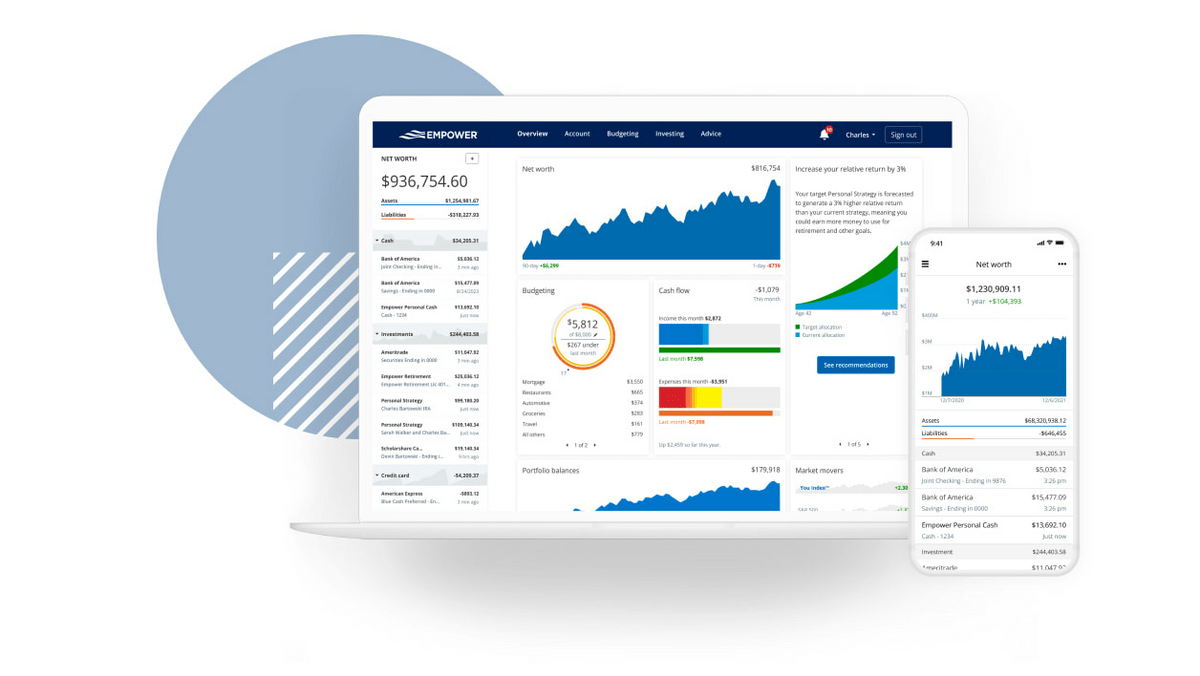
Net Worth Tracking: Empower automatically calculates your net worth by aggregating all your assets and liabilities. You’ll see a snapshot that updates throughout the trading day.

Cash Flow & Budgeting: The app uses a cash flow graph to show money moving in and out based on your connected accounts. You can set monthly budget targets and track spending by category, though it’s more basic than dedicated budgeting apps.

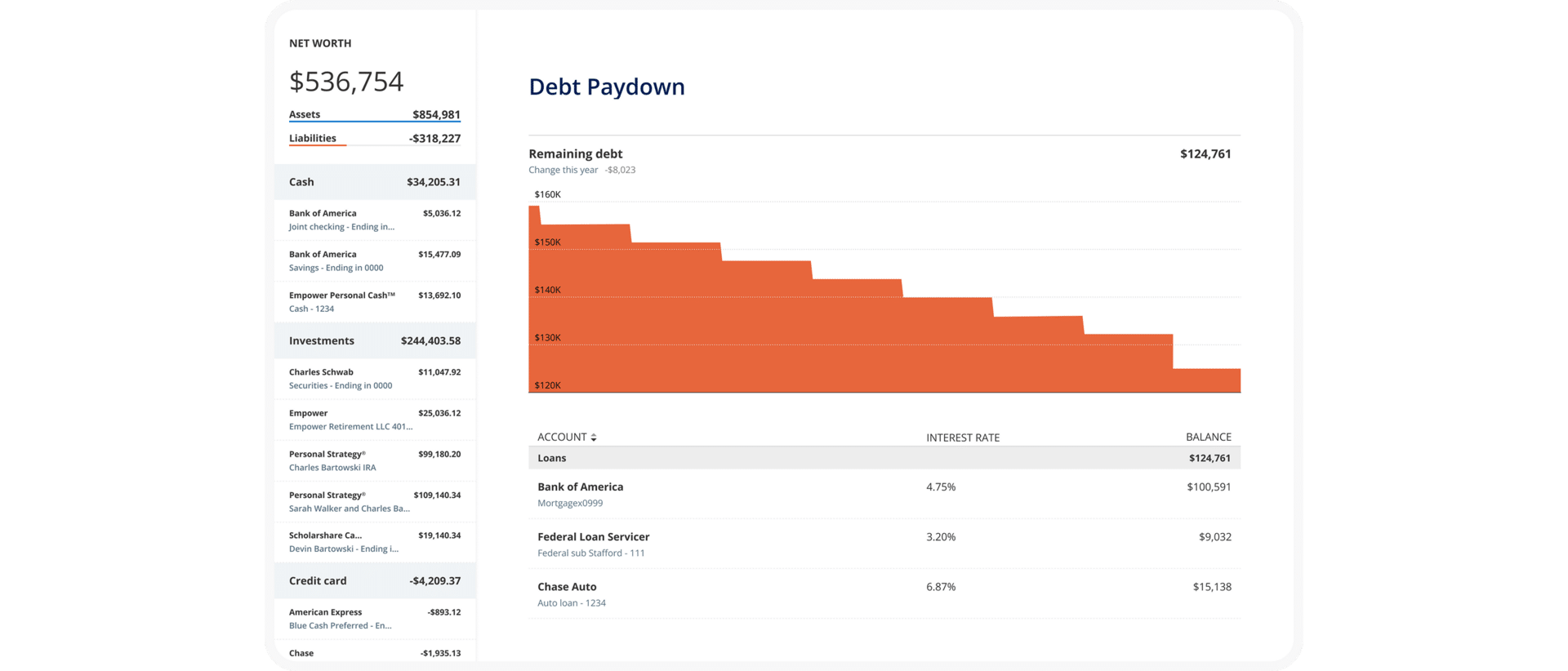
Empower doesn’t just show you what you owe — it actively visualizes how your debt changes over time. The debt paydown view breaks liabilities into individual loans, shows interest rates side by side, and tracks progress as balances decline month by month.
This makes it easier to prioritize high-interest debt, understand how payments affect your net worth, and stay motivated by seeing real progress rather than static balances. It’s a practical planning layer that most “net worth” apps skip entirely.
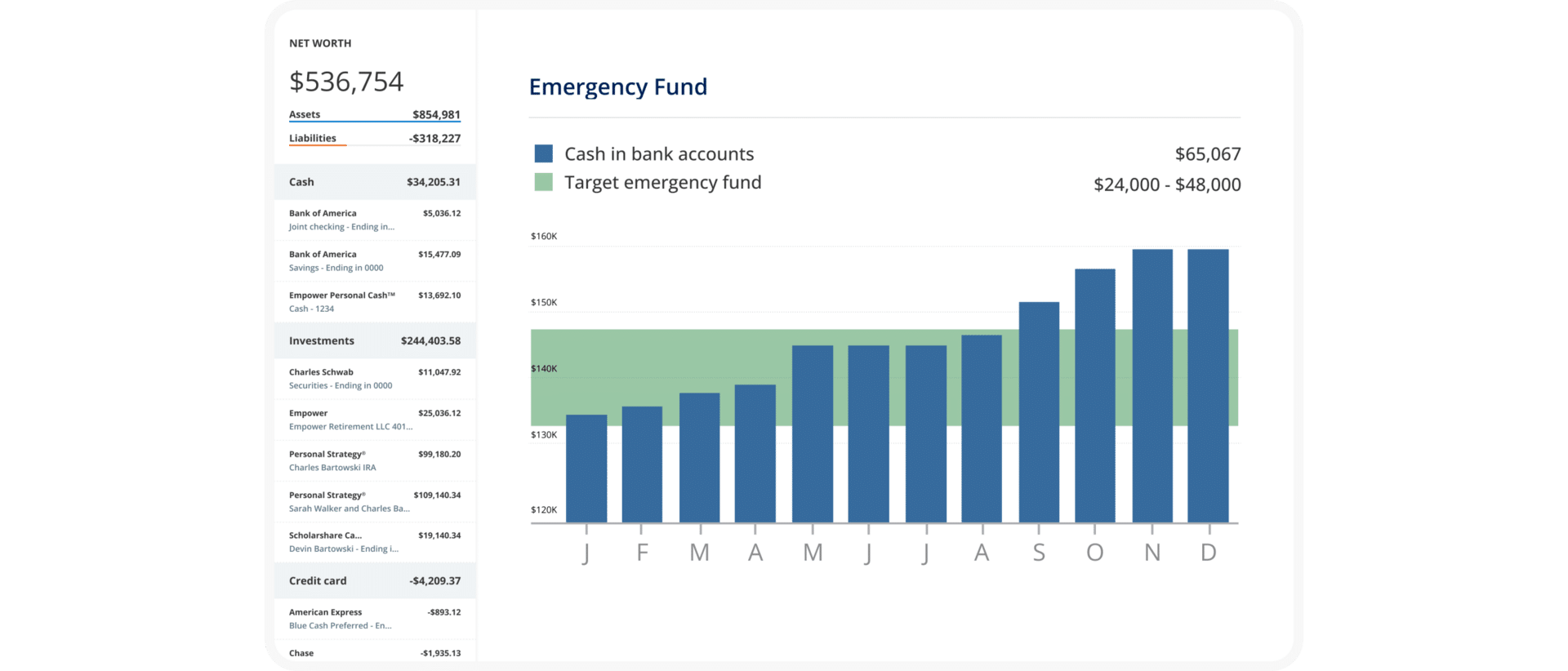
Empower also includes an emergency fund planner that helps bridge the gap between abstract advice and real numbers. Instead of a generic “save three to six months” rule, the app compares your actual cash balances to a personalized target range based on spending patterns.
Seeing your current cash plotted against that target helps make it clear whether you’re under-funded, on track, or carrying excess idle cash — a nuance that’s especially useful for people balancing investing with liquidity.
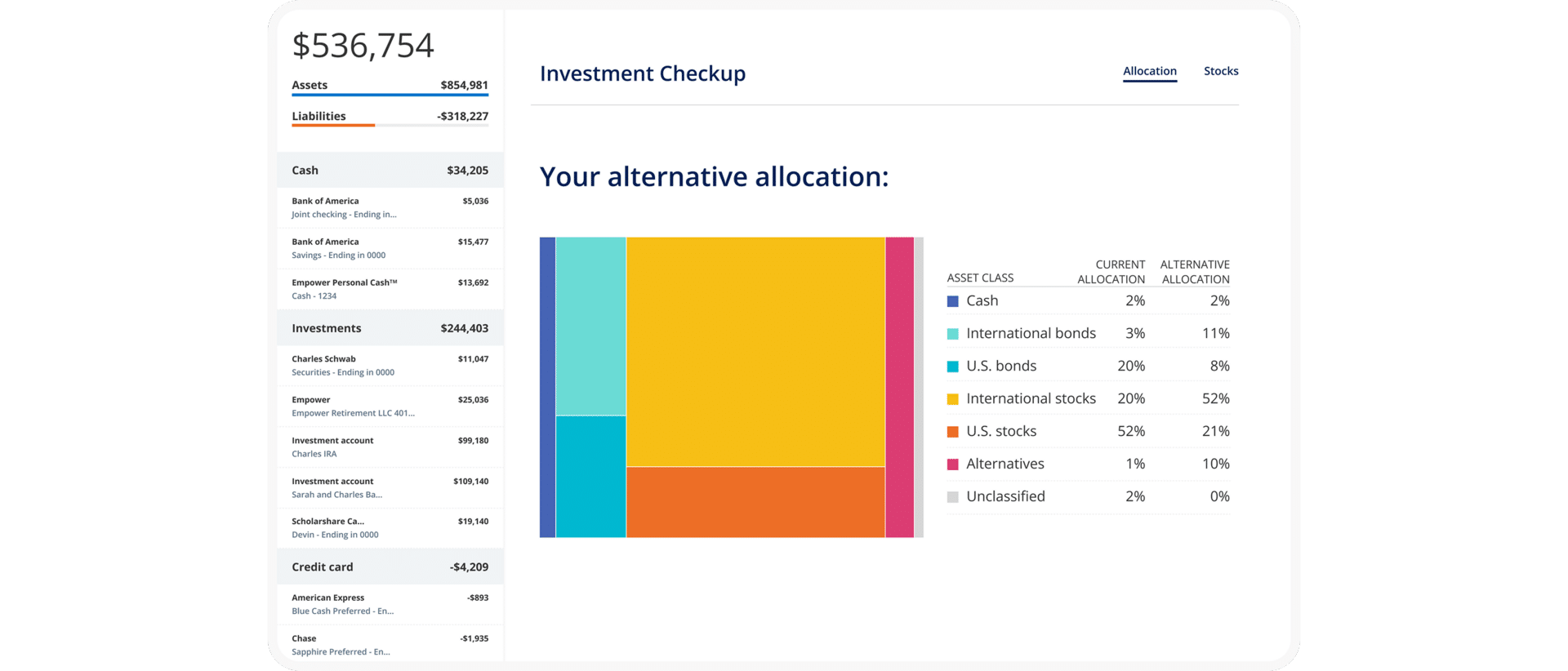
Investment Tracking: This is where Empower really shines. The platform offers detailed portfolio analysis including:
- Asset allocation breakdown
- Investment checkup tool
- Performance tracking with time-weighted returns
- Holdings analysis by size, style, and sector
Retirement Planning: Empower includes a free retirement planner that helps project whether you’re on track to meet your retirement goals based on your current savings rate, investment returns, and spending patterns.

Where Empower truly differentiates itself is long-term planning. Its retirement and savings planner pulls together all linked retirement accounts, breaks contributions down by tax treatment, and illustrates whether your current savings rate aligns with future goals.
Instead of a single projection number, you see required annual savings ranges, progress by account, and how changes in contributions affect outcomes. For a free tool, this level of visibility rivals what many paid advisory platforms offer — and it’s something Kubera intentionally does not attempt.

Transaction Tracking: The app tracks recurring payments and transaction timing from linked accounts, helping you see spending patterns and regular expenses.
Target Audience
Empower is ideal for investors who have accumulated multiple investment and retirement accounts over the years. If you’ve switched jobs a few times and have old 401(k) accounts scattered around, or if you maintain both taxable brokerage accounts and retirement accounts, Empower helps you see everything in one place.
The platform is particularly powerful for people in their 30s through 50s who are actively building wealth and need help understanding if they’re diversified properly and tracking growth over time.
Key Strengths
I’ve tested dozens of financial tracking tools, and here’s where Empower excels:
It’s completely free. Unlike Kubera, you don’t pay a subscription fee to access the personal
dashboard features. Among other avenues, Empower makes money by administering
workplace retirement plans to employers and offering paid wealth management services, but the dashboard itself costs nothing.
Deep integration with U.S. financial institutions. Empower connects with most major banks, brokerages, and credit card companies, making account setup relatively painless.
Pricing Structure
The Empower personal dashboard app is 100% free to use. No hidden fees, no trial periods, no credit card required.
Empower does offer paid services — such as their Personal Strategy wealth management service — but this is entirely optional.
Want to see your complete financial picture for free? The Empower app gives you powerful net worth tracking and investment analysis tools without spending a dime. It’s like having a financial advisor’s dashboard without the advisor’s fees.
What is Kubera?
Kubera is a tracking platform designed for investors with diverse, complex portfolios. Launched publicly in 2020, Kubera focuses exclusively on comprehensive wealth tracking.
Unlike Empower, which evolved from an investment advisory firm, Kubera was built from the ground up as a portfolio and net worth tracker. Kubera says thousands of households track tens of billions in assets on the platform.
Core Features
Kubera takes a different approach than the Empower app. Instead of offering budgeting tools and financial planning, it goes deep on one thing: tracking everything you own and owe.
Multi-Asset Support: This is Kubera’s biggest differentiator. The platform supports tracking for:
- Traditional investments: stocks, bonds, mutual funds, and ETFs
- Cryptocurrency: tracking via supported wallet/exchange connections (and crypto assets visible through wallet address connections, depending on what the integration supports)
- Real estate: U.S. home values can be tracked via Zillow integration where available
- Private investments: you can track private holdings alongside the rest of your balance sheet (often via manual entries depending on the asset)
- Precious metals: supports tracking metals like gold using standard market tickers
- Vehicles, domains, and other alternatives: Kubera positions this as a key use case, with integrations for certain categories (e.g., domains) and manual tracking options elsewhere
- Domain names: built-in domain valuation via an Estibot integration
Global Connectivity: Kubera connects to over 20,000 banks, brokerages, and financial institutions worldwide. The platform uses multiple data aggregators (Plaid, Yodlee, Salt Edge) to ensure reliable connections across different countries and institutions.
Multi-Currency Support: Designed for international investors, Kubera supports multi-currency portfolios and lets you view net worth in your preferred base currency — including Bitcoin.
Estate Planning Features: Kubera includes a “Life Beat” feature that can grant read-only access to designated beneficiaries if you become unresponsive. The platform also offers secure document storage for important financial records.
Portfolio Insights: Kubera calculates internal rate of return (IRR) for your investments, providing money-weighted performance tracking across custom time periods. You’ll also get allocation analysis and performance charts.
Target Audience
Kubera is built for investors with complex, diversified portfolios that extend beyond traditional stocks and bonds.
You’re a perfect fit for Kubera if you:
- Hold cryptocurrency or DeFi investments
- Own international assets or maintain accounts in multiple countries
- Track private equity, venture capital, or pre-IPO investments
- Own alternative assets like precious metals, domain names, or collectibles
- Need to manage nested portfolios across trusts, LLCs, or holding companies
Key Strengths
For investors with complex portfolios, these features justify Kubera’s premium pricing:
Comprehensive crypto and DeFi support. If you’re investing in cryptocurrency beyond just holding Bitcoin on Coinbase, Kubera provides extensive coverage. Kubera supports crypto tracking via exchanges/wallets and can reflect DeFi/NFT holdings depending on integrations and wallet address support.
Clean, spreadsheet-like interface. Kubera feels like working in a sophisticated spreadsheet. You can organize assets into custom sheets and sections, making complex portfolios easy to navigate.
Superior for international investors. If you have accounts in multiple countries or hold assets denominated in various currencies, Kubera handles this complexity well.
Pricing Structure
This is where Kubera vs Empower shows the biggest difference. While Empower is free, Kubera charges an annual subscription:
Kubera Essentials: $249 per year ($20.75/month) Includes all core features, unlimited asset tracking, and standard support.
Kubera Black: $2,499 per year Adds nested portfolios for tracking complex entity structures, granular access controls for sharing with advisors or family members, concierge onboarding, and VIP support.
Kubera Family: $225 per year Allows you to securely invite family members or advisors into your Kubera account with separate logins for direct collaboration.
Kubera offers a 14-day trial; the subscription plan is chosen after the trial.
For context, 40 years of Kubera Essentials would cost $9,960 — capital that could otherwise remain invested and compound. This makes the cost difference versus free alternatives like Empower significant for long-term users.
Head-to-Head Comparison: Empower vs Kubera
Now let’s dig into the details. When you’re choosing between Empower and Kubera, these are the key factors to consider.
Feature Comparison Table
Feature | Empower | Kubera |
Price | Free forever | $249/year (Essentials) or $2,499/year (Black) |
Budgeting | Cash flow tracking & spending categorization | None |
Investment Tracking | Excellent – includes fee analyzer & investment checkup | Good for all asset classes |
Crypto Support | Basic manual cryptocurrency tracking (no wallet/exchange integrations) | Automated tracking (wallets, exchanges, DeFi, NFTs) |
Net Worth Calculation | Yes, with daily updates | Yes, automatic |
Retirement Planning | Free retirement planner included | None |
Multi-Currency | U.S. dollar primary | Full multi-currency support |
Alternative Assets | Limited (crypto via manual entry; no NFTs/domains) | Supports real estate, precious metals, domains, NFTs |
Estate Planning | None | Life Beat beneficiary feature |
Document Storage | Secure vault included | Secure vault included |
Portfolio Analysis | Robust (fee analyzer, allocation, time-weighted returns) | IRR calculation & allocation |
International Support | Optimized for U.S. investors | Global (20,000+ institutions) |
Mobile App | Native iOS (4.6★) & Android (3.8★) apps | Browser-based only (no native apps) |
Account Sharing | None | Family plan available (~$225/year) |
Budgeting & Expense Tracking
Here’s the truth: neither platform is a dedicated budgeting app.
Empower offers basic budgeting features through its cash flow tracker. You can see your income and expenses categorized automatically, set monthly spending targets, and track whether you’re trending over or under budget. It’s helpful for getting a high-level view of your spending patterns.
However, Empower lacks the granular budgeting categories you’d find in apps like YNAB or Mint. You can’t create detailed line-item budgets for groceries, entertainment, dining out, and other specific categories. Think of it as a 30,000-foot view rather than a detailed spending plan.
Kubera doesn’t include any budgeting features. Period. This is strictly a net worth and portfolio tracking tool, not an all-in-one personal finance platform. If you want budget tracking, you’ll need to use a separate app alongside Kubera.
Winner: Empower, but neither is ideal if budgeting is your primary need.
Investment Tracking & Portfolio Management
Both platforms excel here, but in different ways.
Empower provides robust investment tracking for traditional portfolios. The investment checkup tool analyzes your asset allocation, identifies concentrated positions, and allows portfolio comparisons to major indices.
As of 2026, Empower has expanded its asset tracking to include cryptocurrency holdings, which users can manually add to their dashboard alongside traditional investments. Empower’s crypto tracking is manual (you enter holdings) and price data updates periodically per Empower’s crypto-tracking documentation.
However, Empower doesn’t support wallet or exchange integrations — you must manually input and update your crypto positions. This has narrowed the gap somewhat between Empower and Kubera.
Empower’s portfolio performance tracking shows time-weighted returns across your entire portfolio. This helps you understand if you’re actually beating the market or just riding the wave during bull markets.
Kubera matches Empower’s traditional investment tracking and extends it to asset classes Empower still can’t handle comprehensively. While Empower now supports basic manual crypto tracking, Kubera provides automated wallet and exchange integrations, tracks DeFi protocols, values NFT collections, monitors private equity investments with capital calls and distributions, and values domain names and other alternative assets.
If you’re holding DeFi positions, tracking NFT collections, managing private equity investments, or valuing domain names, Kubera is purpose-built for this complexity.
Kubera also shines for investors who need to track performance across multiple currencies or compare returns against Bitcoin rather than dollars.
Winner: Empower for traditional stock and bond portfolios; Kubera for diverse portfolios including comprehensive crypto, NFTs, and alternative investments.
Net Worth Calculation
Both platforms automatically calculate your net worth by aggregating assets and subtracting liabilities.
Empower updates net worth regularly, including intraday investment price updates during market hours. You’ll see historical charts showing your net worth trajectory over time. The platform includes all your connected accounts — checking, savings, credit cards, loans, mortgages, and investment accounts.
Kubera includes a “Fast Forward” feature that lets you add hypothetical assets or liabilities to see how your net worth might look in different scenarios. However, this is not a full financial planning tool — it doesn’t do cash flow forecasting, investment return modeling, or retirement simulations like Empower’s retirement planner does.
Winner: Empower for comprehensive financial planning; Kubera if you need multi-currency net worth tracking.
User Interface & Experience
The desktop experience matters for financial apps since you’re often reviewing complex data that’s easier to digest on a larger screen.
Empower‘s web dashboard provides an “institutional-grade” design with colorful charts, pie graphs, and trend lines visualizing your net worth, portfolio allocation, cash flow, and retirement planning all on one screen. This comprehensive approach means powerful analytical tools are available without clicking through multiple screens — though the interface can feel busy or packed with information.
Empower’s native mobile apps (iOS 4.6★, Android 3.8★) provide a streamlined experience with biometric login and push notifications for account alerts. The mobile interface simplifies the desktop’s elaborate visuals into clean lists optimized for quick status checks.
Kubera‘s interface takes a minimalist, spreadsheet-inspired approach — assets are listed in rows organized by category with minimal graphs on the main screen. The design has virtually no learning curve if you’re familiar with Excel, though you’ll need to navigate to separate pages for performance charts and allocation breakdowns.
Kubera does not offer native iOS or Android apps; instead, it provides a Progressive Web App (PWA) accessible through your mobile browser. While responsive and functional, the PWA lacks push notifications and other advantages of native apps.
Winner: Empower for comprehensive visual dashboards and native mobile apps with biometric login and notifications; Kubera if you prefer a simple spreadsheet-style interface and don’t mind a web-based mobile experience.
Security & Privacy
Both Empower and Kubera use strong, industry-standard security practices, but their business models create different privacy tradeoffs.
Empower uses 256-bit encryption, multi-factor authentication, and alerts for suspicious login activity. Account connections are read-only and securely tokenized through reputable aggregators like Plaid and Yodlee.
Empower is also an investment advisory firm, and some users may be contacted about optional paid wealth management services. This outreach is part of how the free dashboard is monetized — but these services are entirely optional and can be declined.
Kubera also uses 256-bit SSL encryption and two-factor authentication, with read-only account access through third-party aggregators (Plaid, Yodlee). Its subscription-only model means it doesn’t offer advisory services or third-party financial products. Kubera may still contact users about product updates or its own services, as noted in its privacy policy.
Both platforms use reputable aggregators, and neither stores your bank login credentials directly.
Winner: Tie. Both offer equally strong security protections. Empower may contact you about optional advisory services as part of its free business model, while Kubera contacts about product updates. The security measures themselves are identical.
Integrations & Account Connectivity
Empower connects with most major U.S. banks, brokerages, and credit card companies. The connection process is generally smooth, though like all financial apps, you’ll occasionally need to re-authenticate accounts.
The platform integrates well with major brokerages like Fidelity, Vanguard, Charles Schwab, and TD Ameritrade. As of 2026, Empower has added manual cryptocurrency tracking to its dashboard (users enter holdings and prices auto-update), allowing users to monitor their crypto holdings alongside traditional investments.
However, Empower doesn’t support wallet or exchange integrations, NFTs, domain names, or the full breadth of alternative assets that Kubera handles.
Kubera connects to over 20,000 financial institutions globally. The platform uses multiple aggregators and automatically selects the best connector for each institution, which improves connection reliability.
For cryptocurrency, Kubera provides comprehensive tracking with automated integrations. It connects with major exchanges (Coinbase, Binance, Kraken) and supports direct wallet connections to MetaMask, Ledger, and other popular wallets.
DeFi protocol tracking works via wallet address connection, and Kubera also tracks NFT collections and domain name valuations.
Winner: Empower for U.S. traditional accounts; Kubera for international accounts and comprehensive crypto/alternative asset connectivity.
Mobile App Functionality
Empower offers both iOS and Android apps with most desktop features available. The mobile experience is convenient for checking your net worth and recent transactions on the go, though detailed portfolio analysis is better on desktop.
As of January 2026, Empower’s mobile app has a 4.6 out of 5 star rating on the iOS App Store and 3.8 stars on Google Play (as of January 2026 listings).
Kubera is primarily a browser-based application that users can install as a progressive web app (PWA) on mobile devices. It does not have native iOS or Android apps. The web-based interface provides access to your portfolio and net worth tracking on mobile, but the experience is optimized for desktop use where you can leverage the full spreadsheet-like functionality.
Winner: Empower for native mobile app support across both major platforms.
Customer Support
Empower provides email support and extensive online help resources. If you’re a user of the paid wealth management service or a workplace plan participant, you get direct advisor access, but free dashboard users have more limited support options.
Kubera offers email support for all subscribers, with Kubera Black subscribers receiving priority support and 1:1 Zoom calls. The help center includes comprehensive documentation and FAQs.
Both companies have responsive email support teams, but neither offers live chat or phone support for their basic tiers.
Winner: Tie for basic support; Kubera Black wins if you need premium support. Do remember, however – it’s a paid service, while Empower’s dashboard is completely free.
Pricing & Value
This is the fundamental difference in the Empower vs. Kubera comparison.
Empower is completely free. You get net worth tracking, investment analysis, fee detection, retirement planning, and basic budgeting at no cost. For users primarily tracking traditional assets, the value proposition is hard to beat.
Kubera costs $249 per year. For some users, that price is absolutely worth it — especially if you hold cryptocurrency, international assets, or complex portfolios that free apps don’t handle well. For others, it’s a tough sell when Empower covers many core tracking features for free.
To put the cost in perspective: if you start using Kubera at age 35 and continue until age 75, you’ll spend $9,960 on subscriptions. Invest that same $249 at the beginning of each year at a 7% annual return instead, and it would grow to over $52,000 after 40 years.
Winner: Empower for most users; Kubera if you need its specialized asset coverage.
Who Should Choose Empower?
The Empower Personal Dashboard is the right choice if you:
Have a traditional investment portfolio. If most of your wealth is in stocks, bonds, mutual funds, ETFs, and retirement accounts like 401(k)s and IRAs, the Empower Personal Dashboard gives you everything you need. Its investment analysis tools rival many paid retail wealth platforms.
Want to pay zero dollars. Free isn’t just good — it’s hard to beat. The Empower Personal Dashboard delivers real value without requiring a credit card. There’s no trial period that converts into a subscription and no paid tier you need to unlock.
Need basic budgeting alongside investment tracking. While not as robust as dedicated budgeting apps, Empower’s cash flow tracking and spending categorization work well for high-level monitoring. If you want insight into spending patterns without managing granular budgets, it’s more than sufficient.
Value retirement planning tools. The free retirement planner is genuinely useful, projecting retirement readiness based on current savings, contributions, and estimated Social Security benefits — a feature many comparable tools reserve for paid users.
Prioritize U.S. account connectivity. Empower works best with American banks and brokerages. If all your accounts are U.S.-based, you won’t miss Kubera’s international features.
Who Should Choose Kubera?
Kubera is the better option if you:
Hold significant cryptocurrency or DeFi investments. This is Kubera’s killer feature. While Empower added basic manual cryptocurrency tracking in 2026 (where users enter holdings and prices auto-update), Kubera provides comprehensive automated tracking with wallet and exchange integrations, DeFi protocol monitoring, and NFT collection valuation that Empower doesn’t offer.
If you’re tracking positions across multiple wallets, participating in DeFi protocols on Ethereum/BSC/Polygon, or holding NFT collections, Kubera provides visibility that other apps simply cannot match.
Manage international assets or multi-currency portfolios. Expats, global investors, and anyone with accounts in multiple countries will appreciate Kubera’s international connectivity and multi-currency support. Being able to view your net worth in your home currency while tracking assets denominated in various currencies is incredibly valuable.
Own alternative investments. Private equity, venture capital, precious metals, domain names, collectibles — Kubera tracks them all with appropriate valuations and performance calculations. If your wealth extends beyond traditional securities, Kubera justifies its subscription cost.
Need estate planning features. The Life Beat beneficiary system and secure document storage make Kubera useful for estate planning. This is particularly valuable for cryptocurrency holders, since crypto assets are notoriously difficult for beneficiaries to locate and access after someone passes.
Track wealth across multiple entities. With Kubera Black, you can create nested portfolios for trusts, holding companies, and family structures. This is essential for high-net-worth individuals with complex ownership structures.
The Kubera Family plan also allows you to securely collaborate with family members or advisors through separate logins, making joint financial management seamless.
Alternatives: Other Apps Like Empower
While this is primarily a Kubera vs Empower comparison, I’d be remiss not to mention other strong options in this space. If neither platform quite fits your needs, consider these alternatives.
Here are a few apps like Empower worth considering — each offering a different balance of features, pricing, and specialized capabilities. Whether you need stronger budgeting tools or are looking for another free app like Empower, these options deserve your attention.
Monarch Money
Combines robust category-based budgeting with net worth and investment tracking in a polished interface.
Unlike Empower’s basic budgeting, Monarch’s budgeting is more powerful and flexible. Plans are typically $14.99/month or $99.99/year. If you’re looking for an app like Empower but with robust budgeting capabilities, Monarch is an excellent choice—offering comprehensive budgeting plus investment overview without Kubera’s higher price tag.
Simplifi by Quicken
Simplifi offers spending tracking, budgeting, and net worth monitoring, often at a lower price point than Monarch.
Its interface is user-friendly with strong transaction categorization, but it’s more focused on budgeting and cash flow than in-depth portfolio analysis.
Copilot Money (iOS only)
Copilot Money is a premium, iOS-centric app (~$69–$95/year) with excellent transaction tracking and budgeting tools, smart categorization, and net worth views.
It’s especially appealing to iPhone users who want a clean, intuitive mobile experience, though its investment tracking isn’t as deep as Empower’s.
YNAB (You Need a Budget)
YNAB is a budgeting-first platform focused on zero-based budgeting and deliberate money management. It doesn’t track investment performance, but it’s one of the most respected tools for disciplined budgeting. After a free trial, plans are typically around $99/year.
Conclusion
So which wins the Empower app versus Kubera showdown?
For most investors, Empower is the clear winner. It’s free, provides excellent investment tracking and fee analysis, includes basic budgeting, now supports cryptocurrency tracking as of 2026, and offers retirement planning tools. Unless you have specific needs that require Kubera’s specialized features, starting with Empower makes perfect financial sense.
Kubera justifies its $249/year cost (or $2,499/year for Black) for a specific audience: serious cryptocurrency enthusiasts who need DeFi and NFT tracking, international investors, those with alternative asset portfolios (domain names, private equity, precious metals), and people who value privacy-focused tools.
While Empower now offers basic crypto tracking, Kubera provides comprehensive coverage of DeFi protocols, NFT collections, and alternative assets that Empower still doesn’t support.
If your wealth extends significantly beyond traditional stocks, bonds, and basic crypto holdings, Kubera provides tracking capabilities you simply won’t find elsewhere for free.
My recommendation? Start with Empower. It’s free, so there’s zero downside. Use it for a few months to understand your complete financial picture. If you find yourself frustrated by limited DeFi support, unable to track NFT collections, needing domain name valuations, or requiring multi-currency features, then consider Kubera’s 14-day trial.
You might even use both — Empower for your traditional accounts, retirement planning, and basic crypto tracking; Kubera for your DeFi positions, NFT collections, and alternative investments. There’s no rule saying you must pick just one.
The goal isn’t to find the “perfect” financial app. It’s to find the tool that helps you make better financial decisions. Whether that’s the free, comprehensive Empower personal dashboard app or the specialized power of Kubera depends entirely on your unique financial situation.
Ready to take control of your financial life? Whether you choose Empower’s free platform or Kubera’s premium tracking, the important thing is starting today. Seeing your complete net worth in one place is the first step toward building real wealth.
FAQ: Kubera vs Empower
FAQs:
Is Kubera better than the Empower app?
It depends on your needs. Kubera is better for investors with cryptocurrency (especially DeFi and NFTs), international assets, or alternative investments like private equity and precious metals.
However, Empower is better for most people because it's completely free, offers investment fee analysis, includes retirement planning tools, provides basic budgeting features, and added cryptocurrency tracking in 2026.
The key difference is that while Empower now supports basic crypto, Kubera provides comprehensive DeFi protocol tracking, NFT collections, and alternative asset coverage (like domain names) that Empower doesn't offer.
Unless you need Kubera's specialized features, Empower delivers more value at no cost.
What's the main difference between Kubera vs Empower?
Price and asset coverage are the main differences. Empower is free and focuses on traditional investments with basic budgeting, while Kubera costs $249/year (Essentials) or $2,499/year (Black) and specializes in tracking diverse asset classes.
While Empower added cryptocurrency tracking in 2026, Kubera provides more comprehensive coverage for crypto (including DeFi and NFTs), domain names, and other alternative investments that Empower doesn't track.
Empower works best for U.S.-based investors with traditional portfolios, while Kubera serves global investors with complex, multi-asset portfolios.
Is the Empower personal dashboard app really free?
Yes, the Empower personal dashboard is completely free with no hidden costs or trial periods. You get full access to net worth tracking, investment analysis, fee detection, retirement planning, and basic budgeting without paying anything.
Empower does offer paid wealth management services starting at 0.89% annually for accounts over $100,000, but this is entirely optional.
The dashboard remains free forever regardless of whether you use the paid advisory services.
Can Kubera replace Empower for budgeting?
No. Kubera has zero budgeting features — it's strictly a net worth and portfolio tracker, not a budgeting app. If you need budgeting tools,
Empower's basic cash flow tracking is significantly better than nothing, or you should consider dedicated budgeting apps like YNAB, Monarch, or Simplifi alongside Kubera for investment tracking.
Kubera deliberately focuses on comprehensive asset tracking rather than trying to be an all-in-one personal finance platform.
Which app is better for tracking net worth: Kubera or Empower?
Both platforms excel at net worth tracking with automatic calculations and historical charts. Empower updates your net worth during market hours and includes all traditional accounts plus cryptocurrency tracking as of 2026.
Kubera offers the same core functionality plus multi-currency support and the ability to track alternative assets. Empower tracks traditional and crypto assets but can't automatically value NFTs, DeFi protocols, domain names, or alternative assets like precious metals and private investments that Kubera can.
Choose Empower for traditional net worth tracking with basic crypto support or Kubera if your wealth includes diverse asset classes requiring comprehensive DeFi, NFT, and alternative asset tracking.
Is Kubera worth paying for?
Kubera is worth $249/year (Essentials) if you hold significant cryptocurrency or DeFi positions, manage international accounts, own alternative assets (private equity, precious metals, domain names), or value privacy and estate planning features.
The $2,499/year Kubera Black tier adds nested portfolios for complex entity structures and VIP support. The $225/year Kubera Family plan allows secure collaboration with family members or advisors through separate logins.
It's not worth the cost if you only track traditional stocks, bonds, and bank accounts — Empower now provides that for free, including basic crypto tracking as of 2026.
Consider Kubera's 14-day trial to determine if the specialized features justify the annual subscription for your situation.
What is the best app like Empower?
For premium alternatives with budgeting, Monarch Money ($99.99/year) provides excellent all-in-one financial management.
If you need specialized crypto and alternative asset tracking beyond what Empower offers, Kubera ($249/year) is the strongest option.
Choose based on whether you prioritize being free (Empower), budgeting (Monarch), or comprehensive asset coverage (Kubera).
Does Empower track investments as well as Kubera?
For traditional investments (stocks, bonds, mutual funds, ETFs, retirement accounts), Empower and Kubera are comparable. Empower actually offers better investment analysis with its fee analyzer and investment checkup tools.
Empower added cryptocurrency tracking to its dashboard in 2026, which narrowed the gap.
However, Kubera still far exceeds Empower for tracking DeFi protocols, NFT collections, private equity, precious metals, domain names, and other alternative assets that Empower doesn't support.
Empower focuses depth on traditional assets plus basic crypto; Kubera covers breadth across all asset classes.
Is Kubera safe to use?
Yes, Kubera uses bank-level security with 256-bit SSL encryption for data in transit and AES-256 encryption for data at rest. The platform employs two-factor authentication and regular third-party security audits.
Kubera connects to financial accounts through established aggregators like Plaid that use tokenized, read-only access — meaning Kubera never stores your actual login credentials.
The subscription-only business model also means Kubera doesn't sell your financial data for marketing purposes.
Can I use both Kubera and Empower together?
Yes, many investors use both platforms simultaneously. Empower excels at traditional investment analysis, fee detection, and retirement planning — all free.
Kubera handles cryptocurrency, international assets, and alternative investments that Empower can't track well.
Using both gives you Empower's free analytical tools for traditional accounts plus Kubera's comprehensive tracking for your entire wealth including crypto and alternatives.
The combined approach maximizes visibility into your complete financial picture.
Where to Invest $1,000 Right Now?
Did you know that stocks rated as "Buy" by the Top Analysts in WallStreetZen's database beat the S&P500 by 98.4% last year?
Our March report reveals the 3 "Strong Buy" stocks that market-beating analysts predict will outperform over the next year.